
Events
Overview
Events are organized in a tree structure where events flow down from parent nodes to child nodes. When you call an event, it first processes on the node you fired it on, then passes down to all matching children (sorted by priority). Each child node can filter events based on the event's type and fields.
Each node contains an event class filter (only events of this type can enter, e.g. PlayerEvent or InstanceEvent), a condition for additional filtering (e.g. player.getGameMode() == GameMode.CREATIVE), a list of listeners, a name for identification, and a priority.
API
Node
// Can listen to any Event, without any condition
EventNode<Event> node = EventNode.all("demo");
// Can only listen to entity events
EventNode<EntityEvent> entityNode = EventNode.type("entity-listener", EventFilter.ENTITY);
// Can only listen to player events
EventNode<PlayerEvent> playerNode = EventNode.type("player-listener", EventFilter.PLAYER);
// Listen to player events with the player in creative mode
EventNode<PlayerEvent> creativeNode = EventNode.value("creative-listener", EventFilter.PLAYER, player -> player.getGameMode().equals(GameMode.CREATIVE));
Each node needs a name to be debuggable and be retrieved later on, an EventFilter containing the event type target and a way to retrieve its actor (i.e. a Player from a PlayerEvent). All factory methods accept a predicate to provide an additional condition for filtering purposes.
Listener
There are several ways to register event listeners, depending on your needs.
Simple inline listener
The most common way is to pass a lambda directly to addListener:
EventNode<Event> node = EventNode.all("demo");
node.addListener(PlayerChatEvent.class, event -> {
    event.getPlayer().sendMessage("You sent a message!");
});
Using EventListener.of
You can create a reusable listener with EventListener.of:
EventListener<PlayerChatEvent> chatListener = EventListener.of(PlayerChatEvent.class, event -> {
    event.getPlayer().sendMessage("You sent a message!");
});

node.addListener(chatListener);
// Can be removed later
node.removeListener(chatListener);
Implementing EventListener
For more complex listeners, you can implement the EventListener interface:
public class MyChatListener implements EventListener<PlayerChatEvent> {
    @Override
    public Class<PlayerChatEvent> eventType() {
        return PlayerChatEvent.class;
    }

    @Override
    public Result run(PlayerChatEvent event) {
        event.getPlayer().sendMessage("You sent a message!");
        return Result.SUCCESS;
    }
}

node.addListener(new MyChatListener());
Using the builder
For advanced features like expiration and filtering, use the builder:
node.addListener(EventListener.builder(EntityTickEvent.class)
    .expireCount(50) // Automatically remove after 50 executions
    .expireWhen(event -> event.getEntity().isGlowing()) // Remove when condition is true
    .filter(event -> event.getEntity().getVelocity().length() > 0) // Only call if moving
    .handler(event -> System.out.println("Entity tick!"))
    .build());
The builder supports:
expireCount(int): Remove the listener after N callsexpireWhen(Predicate): Remove the listener when a condition becomes truefilter(Predicate): Only call the handler if the predicate passesignoreCancelled(boolean): Whether to skip cancelled events (default: true)
Type safety
Listeners are type-checked based on the node's event filter:
EventNode<PlayerEvent> playerNode = EventNode.type("player-listener", EventFilter.PLAYER);
playerNode.addListener(PlayerTickEvent.class, event -> {}); // Works
// playerNode.addListener(EntityTickEvent.class, event -> {}); // Doesn't compile
Child
Child nodes inherit their parent's filters and can add additional filtering. A child node must accept either the same type or a more specific subtype of an event than its parent. Events pass from parent to child, with each level potentially adding more filtering.
EventNode<Event> globalNode = EventNode.all("global");
EventNode<PlayerEvent> playerNode = EventNode.type("player-listener", EventFilter.PLAYER);
EventNode<PlayerEvent> creativeNode = EventNode.value("creative-listener", EventFilter.PLAYER,
    player -> player.getGameMode().equals(GameMode.CREATIVE));

globalNode.addChild(playerNode);      // Works: PlayerEvent is a subtype of Event
playerNode.addChild(creativeNode);    // Works: both are PlayerEvent, creative only adds an extra condition

// playerNode.addChild(globalNode); -> Doesn't compile: the parent cannot be more general than the child
Event execution
Events can be called from any node in the tree, not just the root. When you call an event on a node, it processes on that node and passes down to all children. Events never propagate upward to parent nodes.
EventNode<Event> globalNode = EventNode.all("global");
EventNode<PlayerEvent> playerNode = EventNode.type("player-listener", EventFilter.PLAYER);
globalNode.addChild(playerNode);

// Calling from the root: affects globalNode and all children (including playerNode)
globalNode.call(new PlayerMoveEvent(...));

// Calling from a child: only affects playerNode and its children (globalNode is skipped)
playerNode.call(new PlayerMoveEvent(...));
In practice
Node to use
The root node of the server can be retrieved using MinecraftServer#getGlobalEventHandler().
var handler = MinecraftServer.getGlobalEventHandler();
handler.addListener(PlayerChatEvent.class,
        event -> event.getPlayer().sendMessage("You sent a message!"));
var node = EventNode.all("demo");
node.addListener(PlayerMoveEvent.class,
        event -> event.getPlayer().sendMessage("You moved!"));
handler.addChild(node);
Structure
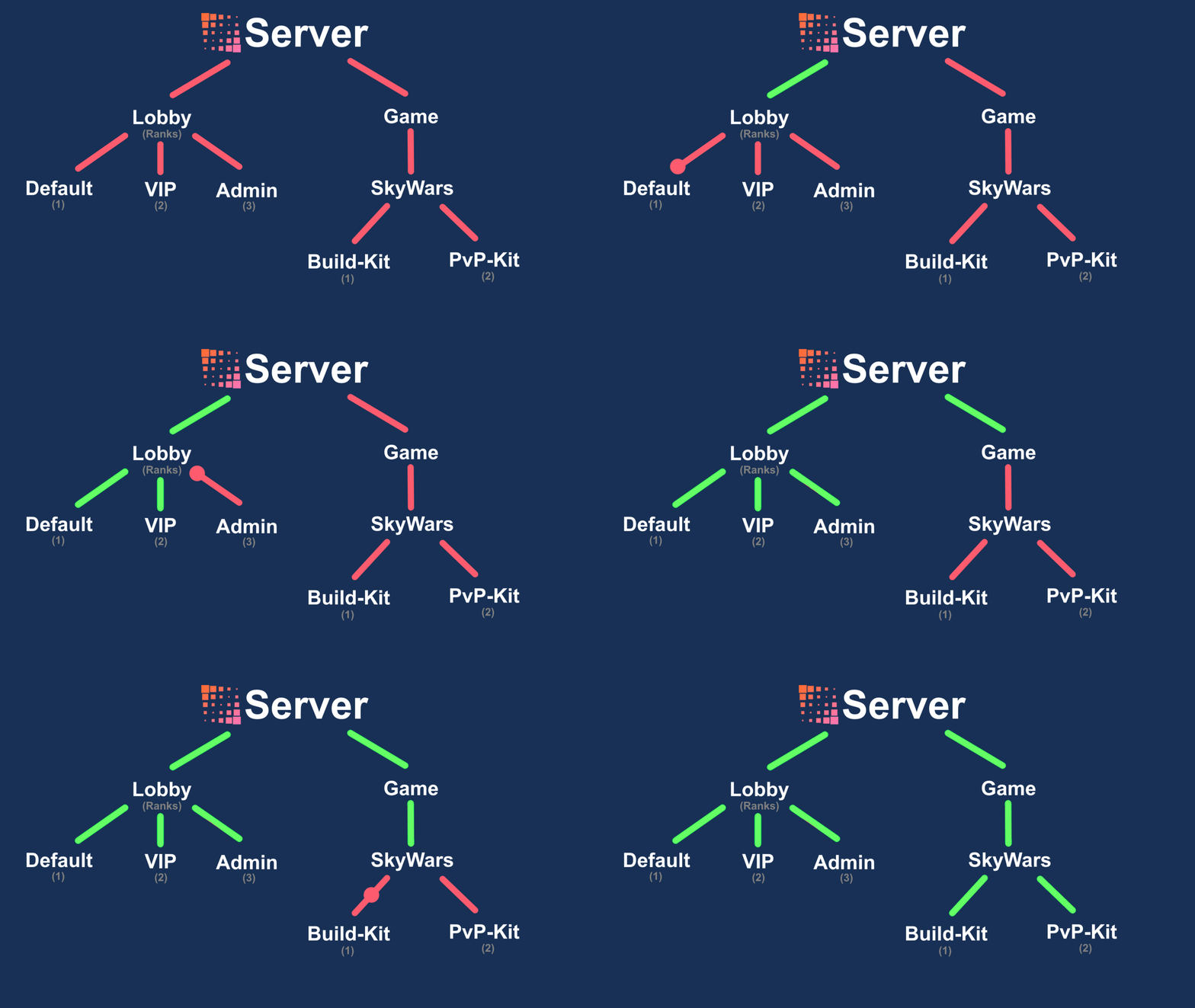
Having an image of your tree is highly recommended, for documentation purposes and ensuring an optimal filtering path. It is then possible to use packages for major nodes, and classes for minor filtering.
server/
   Global.java
   lobby/
      rank/
         - AdminRank.java
         - VipRank.java
      - DefaultRank.java
   game/
      bedwars/
         kit/
            PvpKit.java
            BuildKit.java
         Bedwars.java
      skywars/
         kit/
            PvpKit.java
            BuildKit.java
         Skywars.java
Custom events
You can freely implement the Event interface to model custom events. Traits like CancellableEvent (to stop the execution after a certain point) and EntityEvent (provides a getEntity method) are also present to ensure your code will work with existing logic. You can then choose to run your custom event from an arbitrary node (see an example), or from the root with EventDispatcher#call(Event).
Event traits
Cancellable events
Some events implement CancellableEvent, which allows listeners to cancel the event and prevent further processing.
node.addListener(PlayerMoveEvent.class, event -> {
    if (event.getNewPosition().y() > 100) {
        event.setCancelled(true); // Prevent the player from moving above y=100
    }
});
When an event is cancelled, subsequent listeners on the same node will still run by default. However, you can configure a listener to skip cancelled events:
node.addListener(EventListener.builder(PlayerMoveEvent.class)
    .ignoreCancelled(false) // This listener runs even if the event was cancelled
    .handler(event -> {
        System.out.println("This runs even for cancelled moves");
    })
    .build());
Note that by default, ignoreCancelled is true, meaning most listeners will not run if the event has been cancelled by an earlier listener.
Recursive events
Some event hierarchies use RecursiveEvent to allow parent event listeners to receive child events. This is useful when you want to listen to a broad category of events without registering separate listeners for each specific type.
For example, ProjectileCollideEvent is a recursive event with two subclasses:
ProjectileCollideWithEntityEvent- when a projectile hits an entityProjectileCollideWithBlockEvent- when a projectile hits a block
If you listen to the parent event, you will receive both types:
// This listener will be called for BOTH entity and block collisions
node.addListener(ProjectileCollideEvent.class, event -> {
    System.out.println("Projectile collided at " + event.getCollisionPosition());

    // You can check the specific type if needed
    if (event instanceof ProjectileCollideWithEntityEvent entityCollision) {
        System.out.println("Hit entity: " + entityCollision.getTarget());
    }
});

// Or listen only to the specific subclass
node.addListener(ProjectileCollideWithEntityEvent.class, event -> {
    System.out.println("Only called for entity collisions");
});
Without RecursiveEvent, listening to ProjectileCollideEvent would only receive events of that exact type, not its subclasses. Recursive events make event hierarchies more intuitive.
Implementation
This section will describe what happens when an event is called or when a new node is added, which can help you optimize for performance.
Listener handle
A ListenerHandle represents direct access to an event type listener. Handles are stored inside the node and must be retrieved for the listeners to be executed.
EventNode#call(Event) is as simple as retrieving the handle (through a map lookup) and executing ListenerHandle#call(Event). You can completely avoid the map lookup by directly using the handle, which is why EventNode#getHandle(Class<Event>) exists.
Keeping the handle in a field instead of doing map lookups for every event call may also help avoid object allocation in cases where nothing is listening to the event.
Registration
All registration methods (and methods touching the tree) are synchronized. This is not considered a major flaw since event calling is much more important. However, this means you should avoid temporary nodes and listeners as much as possible.
Event calling
Event calling is straightforward. It first checks if the listeners inside the handle are up-to-date. If not, it loops through all of them to create the consumer. Then it runs the consumer.
This is why you should avoid adding listeners after server initialization, as it will invalidate the associated handles.
Conclusion
The event implementation has been heavily optimized for calling events rather than for registration utilities. This is a reasonable tradeoff, but must be well understood when building a high-performance server.
For those interested, the code is available here.